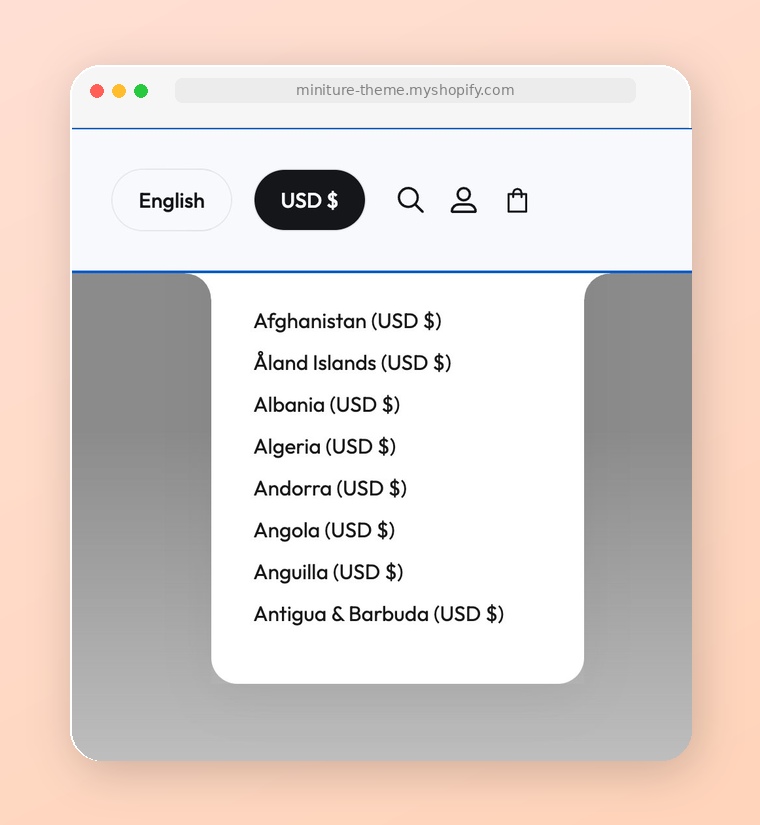
> For the complete documentation index, see [llms.txt](https://docs.novaworks.net/mixtas-shopify-theme/llms.txt). Markdown versions of documentation pages are available by appending `.md` to page URLs; this page is available as [Markdown](https://docs.novaworks.net/mixtas-shopify-theme/global-sections/header/currency-selector.md).
# Currency selector
Learn how to use the Country/region selector.
Using multiple currencies to increase sales and expand your business into new markets.
Using multiple currencies to increase sales and expand your business into new markets.
{% hint style="info" %}
To sell in multiple currencies, you need to use **Shopify Payments** in your online store and activate [international sales tools](https://help.shopify.com/en/manual/international).
[Learn more](https://help.shopify.com/en/manual/payments/shopify-payments/store-currency/multi-currency)
{% endhint %}
### How to add more currencies to your site
{% hint style="success" %}
To add more currencies to your site, refer to this [documentation](https://help.shopify.com/en/manual/international/pricing/set-up-local-currencies).
{% endhint %}
### Enable a currency selector for your store
Once you've added your markets, you'll want to enable the **currency selector** for your theme so that customers can select their local country or region and your store displays their local currency.
{% hint style="success" %}
Steps:
1. From the Shopify admin, go to **Online store** > **Themes** > **Customize**.
2. In the **Header** section, enable the '**Enable country/region selector**' setting.
Note: This setting is for the Mobile layout, and this shows a country/ region selector on the menu drawer.
1. In the **Footer** section, check the option '**Enable country/region selector**' in the Footer on both views.
2. Save the change.
{% endhint %}