> For the complete documentation index, see [llms.txt](https://docs.novaworks.net/inseam/llms.txt). Markdown versions of documentation pages are available by appending `.md` to page URLs; this page is available as [Markdown](https://docs.novaworks.net/inseam/help-and-reference/faq.md).
# FAQ
### Why does my store look different from the demo?
A theme supplies layouts and controls. Your products, photography, collections, menus, and fit entries supply the content. Connect those resources in the editor and remove sections you do not need.
### Do I need Inseam Companion?
No. [Inseam Companion](https://docs.novaworks.net/inseam/fit-and-sizing/inseam-companion) is the recommended quick way to create and connect size charts and fit feedback. You can also [create size charts manually](https://docs.novaworks.net/inseam/fit-and-sizing/size-charts#manual-setup) and [manage feedback manually](https://docs.novaworks.net/inseam/fit-and-sizing/fit-feedback#manual-setup). Both methods use Shopify data displayed by the same Inseam theme blocks.
### Why is my size chart missing?
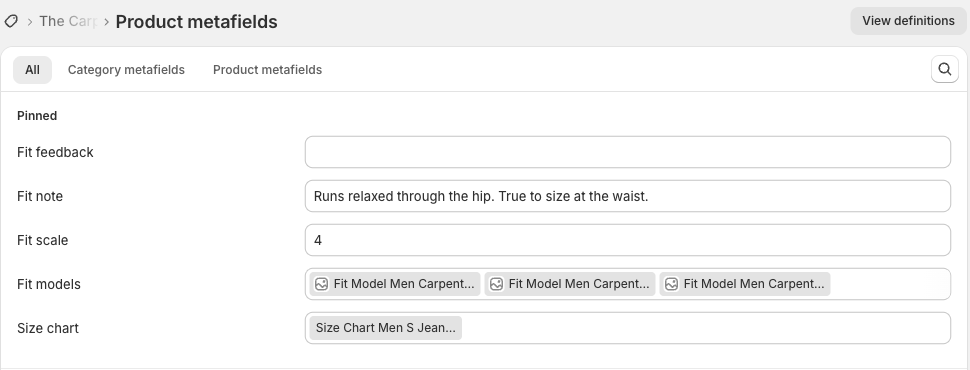
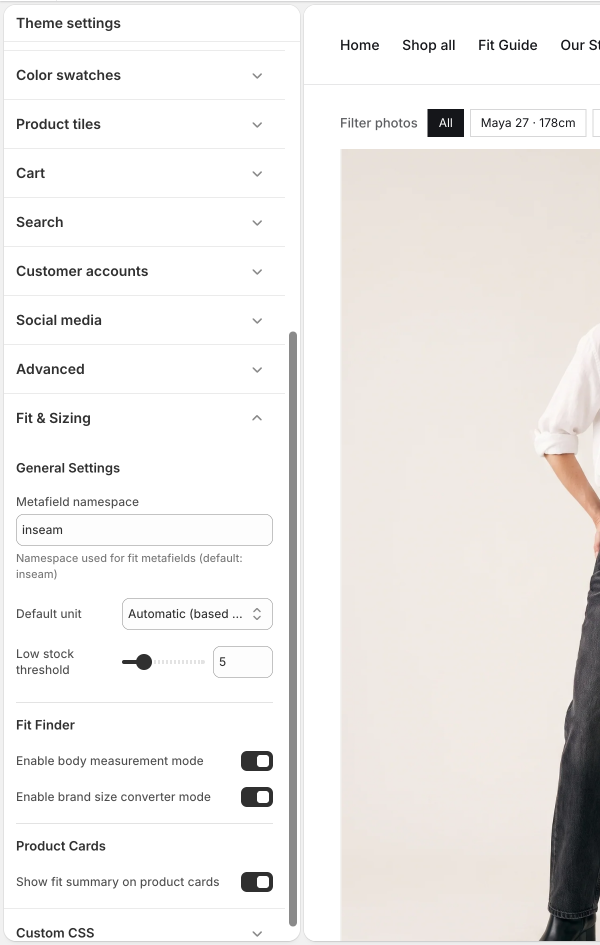
Check that the product has an assigned Size chart entry, that the entry is available to the storefront, and that the Size chart block exists on the assigned template. Check the namespace under **Fit & Sizing**. See [Size charts](https://docs.novaworks.net/inseam/fit-and-sizing/size-charts).
Check that the product has a Size chart reference before troubleshooting the theme block.
Confirm the Metafield namespace under Theme settings → Fit & Sizing.
### Why does selecting a size not highlight the chart?
Use a product option name containing **Size** or **Waist** and matching chart size labels. Check the product actually uses the template you edited.
### Why are model filters missing?
Assign Fit models to the product, add **Size images filter**, and include each model's name in the corresponding image descriptions. Check on desktop; these filters are hidden on mobile. See [Models and gallery filters](https://docs.novaworks.net/inseam/fit-and-sizing/models-and-gallery-filters).
### Why is the fit feedback block empty?
It needs valid response counts. An empty entry or zero total produces no visible summary. See [Fit feedback](https://docs.novaworks.net/inseam/fit-and-sizing/fit-feedback).
### Why did a template edit change several products?
Those products share a template. Create a separate template when a subset needs a different layout, then assign it to the relevant products.
### Why is a homepage product group empty?
Check the selected products or collection, Online Store availability, and the group's configuration. A heading or fit name does not populate products automatically.
### Why does the appearance default seem to be ignored?
A visitor's saved Light, Dark, or System choice takes priority. Test with a fresh browser session or change the storefront appearance preference.
### Why is a product unavailable?
Review its Online Store availability, inventory, variant selection, and selling rules in Shopify. The theme does not create stock or override store purchasing rules.
### Where do I get help?
[Contact Novaworks](https://docs.novaworks.net/inseam/help-and-reference/inseam-support) with the page URL, theme version, reproduction steps, and screenshots if useful.